Installation Guide for Homework Environment
Prerequisites:
The homework requires Python 3.12. You do not need to install it yourself: the homework ships with a pyproject.toml pinned to 3.12, and uv sync (below) downloads that interpreter if it is missing. To confirm, run uv run python --version inside the homework directory after syncing.
Installing uv (Recommended Python Package Manager):
We recommend using uv as it's much faster than pip and conda for managing Python environments and packages.
What is uv?
uv is a modern, Rust-based package + project manager for Python. It keeps the familiar pip workflow but re-implements the engine for speed and reliability. Concretely: it creates a venv, resolves and installs dependencies with its own fast installer, and deduplicates files via a global cache (copy-on-write on macOS, hardlinks on Linux/Windows). It can also manage Python versions per project (e.g., pin 3.12) so each assignment uses a clean, reproducible interpreter. Think "pip + virtualenv + pip-tools + pyenv/pipx".
Installing uv:
Please refer to the official uv installation documentation for the most up-to-date installation instructions for your platform.
Setting Up the Homework Environment with uv:
Create and activate a virtual environment with the required dependencies:
macOS/Linux:
# Install uv once
curl -LsSf https://astral.sh/uv/install.sh | sh

# Optional: `uv` binary by default goes to `$HOME/.local/bin` on Linux/macOS,
# so you may need to add it to your PATH (uv may have done this for you):
export PATH="$HOME/.local/bin:$PATH"
Windows:
# Install uv once
powershell -ExecutionPolicy ByPass -c "irm https://astral.sh/uv/install.ps1 | iex"
# Then open a NEW terminal window so that `uv` is on your PATH
All platforms:
# Download the homework zip and unzip into `hw1_foundations/`
# In your hw directory (it ships with a pyproject.toml pinned to Python 3.12)
uv sync                   # Create .venv, fetch Python 3.12 if needed, install numpy + einops
uv run python grader.py   # Run the local grader
Running on Stanford FarmShare (Optional)
If you cannot run the assignment on your laptop or need additional computing resources, Stanford provides FarmShare, a community computing environment for coursework and unsponsored research. Please follow the instructions at https://docs.farmshare.stanford.edu/ to get started with the computing environment.
Welcome to your first CS221 assignment!
The goal of this assignment is to sharpen your math, programming, and ethical analysis skills
needed for this class. If you meet the prerequisites, you should find these
problems relatively innocuous. Some of these problems will occur again
as subproblems of later homeworks, so make sure you know how to do them.
If you're unsure about them or need a refresher,
we recommend going through our prerequisites module or other resources on the Internet,
or coming to office hours.
Before you get started, please read the Homeworks section on the course website thoroughly.
We've created a LaTeX template (hw1_foundations_template.tex in the same folder as this homework) for you to use that contains the prompts for each question.
Problem 1: Linear Algebra
Linear algebra forms the foundation of modern AI and machine learning. In this problem, you'll work with vectors and matrices using NumPy, which is the standard library for numerical computing in Python and provides efficient implementations of vector and matrix operations that are essential for AI. Understanding these operations is crucial for implementing neural networks, optimization algorithms, and data processing pipelines. For example, the bulk of modern LLMs are just dense matrix multiplications, and NumPy is the first step towards being able to manipulate these matrices. You'll practice basic operations like dot products, matrix multiplication, and distance calculations that appear everywhere in machine learning algorithms.
You'll also learn about Einstein summation notation (einsum), which we'll use through the einops library. Einsum notation allows you to express complex array/matrix/tensor operations concisely, including matrix multiplications, tensor contractions, array reshaping, and pretty much everything used in the modern AI models. einops is a library that allows you to implement einsum notation in Python (from einops import einsum, rearrange). Understanding einsum allows you to code more readable code. If you're new to einsum, this YouTube video and the einops basics tutorial may be helpful.
-
Linear Algebra Complexity: Suppose you have two matrices $A \in \mathbb{R}^{m \times n}$ and $B \in \mathbb{R}^{n \times p}$. What is the time complexity of computing their product $AB$ using the standard matrix multiplication algorithm? Express your answer using big-O notation and briefly justify why.
The time complexity in big-O notation and a 1-2 sentence explanation.
-
Einstein Summation (Written): Given $X \in \mathbb R^{n\times d}$ and $\mathbf w \in \mathbb R^d$:
(i) Write an
einsum string for $X\mathbf w$; (ii) for the pairwise dot-product matrix $XX^\top$; (iii) for $\operatorname{diag}(X^\top X)$ (column-wise squared norms). For each string, briefly explain why it computes the requested quantity.
Use the einops format (e.g., 'n d, d m -> n m') rather than the np.einsum format (e.g., 'nd, dm -> nm').
-
Batch Linear Projection (einsum):
Let $x \in \mathbb{R}^{B\times D_{in}}$ be a batch of input row-vectors, $W \in \mathbb{R}^{D_{in}\times D_{out}}$ a weight matrix, and $b \in \mathbb{R}^{D_{out}}$ a bias vector. We want to compute the following linear transformation in a batched manner:
$y[i] = x[i] W + b$ for each batch index $i$, returning $y \in \mathbb{R}^{B\times D_{out}}$.
Use
einsum (from einops) for the matrix multiplication and NumPy broadcasting for the bias; do not use Python loops.
Implement linear_project(x, W, b) in submission.py with shapes: x:(B,D_in), W:(D_in,D_out), b:(D_out,) → (B,D_out).
-
Split Last Dimension (einops.rearrange pattern string):
Let $x \in \mathbb{R}^{B\times D}$ and let $G$ divide $D$ evenly. We want to reshape the last axis into $G$ equal chunks, producing $y \in \mathbb{R}^{B\times G\times (D/G)}$. Write the
einops.rearrange pattern string that performs this reshape. Do not perform the reshape yourself; just return the pattern string. It is fine to assume D % G == 0.
Implement split_last_dim_pattern() in submission.py returning a rearrange pattern string. The autograder will apply it with the appropriate g=num_groups (note that the group axis must be named exactly g).
-
Normalized Inner Products (einsum):
Let $A \in \mathbb{R}^{B\times M\times D}$ and $C \in \mathbb{R}^{B\times N\times D}$. For each batch $b$, we want the matrix $S[b,i,j] = \langle A[b,i,:], C[b,j,:] \rangle$ of all pairwise dot products, giving $S \in \mathbb{R}^{B\times M\times N}$. Use
einsum (from einops) without loops. If normalize=True, divide the result by $\sqrt{D}$.
Implement normalized_inner_products(A, C, normalize=True) in submission.py with shapes: A:(B,M,D), C:(B,N,D) → (B,M,N).
-
Mask Strictly Upper Triangle:
Let $\text{scores} \in \mathbb{R}^{B\times L\times L}$. For each batch, set entries with column index strictly greater than the row index (i.e., the strictly upper-triangular part where $j>i$) to
-np.inf, leaving other entries unchanged. Construct the mask using NumPy broadcasting; do not use loops. Do not use np.triu, np.tril, np.triu_indices, np.tril_indices, or similar built-in triangular helpers; build the mask yourself from index arrays (e.g., np.arange) and broadcasting.
For example, if $L=3$, transform:
$$\begin{pmatrix} 1 & 2 & 3 \\ 4 & 5 & 6 \\ 7 & 8 & 9 \end{pmatrix} \rightarrow \begin{pmatrix} 1 & -\infty & -\infty \\ 4 & 5 & -\infty \\ 7 & 8 & 9 \end{pmatrix}$$
Implement mask_strictly_upper(scores) in submission.py for scores:(B,L,L), returning a masked array of the same shape.
-
Probability-Weighted Sum (einops.einsum pattern string):
Let $P \in \mathbb{R}^{B\times N}$ be batch-wise probability weights (each row sums to 1) and $V \in \mathbb{R}^{B\times N\times D}$ the corresponding value vectors. Provide only the
einops.einsum pattern string that computes the weighted sums $out[b,:] = \sum_{j=1}^N P[b,j]\, V[b,j,:]$, yielding $out \in \mathbb{R}^{B\times D}$.
Implement prob_weighted_sum_einsum() in submission.py that returns the einsum string; the autograder will apply it to P and V.
Problem 2: Calculus and Gradients
Gradients are essential for training machine learning models through optimization algorithms like gradient descent. In this problem, you'll practice computing gradients analytically and verify your results using numerical methods (finite differences).
The textbook for MATH 51 may be useful for the gradient problems here, specifically the sections "Gradients, Local Approximations, and Gradient Descent" (p. 209).
-
Gradient Warmup: Let's practice taking gradients, which is a key operation for being able to optimize continuous functions. Let $\mathbf w, \mathbf c \in \mathbb R^d$. For $f(\mathbf w)=\sum_{i=1}^d (w_i-c_i)^2$, derive $\nabla f(\mathbf w)$. Then evaluate the gradient at $\mathbf w=\mathbf 0$.
A compact vector expression for $\nabla f(\mathbf w)$ and its value at $\mathbf w = \mathbf 0$. Show your work.
-
Gradient Warmup Implementation:
Given a vector $\mathbf w$ and constants $\mathbf c$, compute the gradient $\nabla f(\mathbf w)$ where $f(\mathbf w)=\sum_{i=1}^d (w_i-c_i)^2$.
Implement gradient_warmup(w, c) in submission.py that takes vectors w and c and returns the gradient vector.
-
Matrix Multiplication Gradient: Consider two matrices $A$ (size $m \times n$) and $B$ (size $n \times p$) that are multiplied together to form $C = AB$, and then all entries of $C$ are summed to produce a scalar $s = \sum_{i,j} C_{i,j}$.
Let $A = \begin{pmatrix} 2 & 1 & 3 \\ 4 & 5 & 6 \end{pmatrix}$ and $B = \begin{pmatrix} 7 & 8 \\ 9 & 0 \\ 1 & 2 \end{pmatrix}$.
Compute $C = AB$ and $s = \sum_{i,j} C_{i,j}$. Then find the gradient $\frac{\partial s}{\partial A_{i,k}}$ for each entry of matrix $A$, and similarly find $\frac{\partial s}{\partial B_{k,j}}$ for each entry of matrix $B$.
The computed matrices $C$ and scalar $s$, plus the gradient matrices $\frac{\partial s}{\partial A}$ and $\frac{\partial s}{\partial B}$ with numerical values for each entry. Show your work, including how you derived the gradients.
-
Matrix Gradient Implementation:
Implement a function that computes the gradients $\frac{\partial s}{\partial A}$ and $\frac{\partial s}{\partial B}$ for the scalar $s = \sum_{i,j} (AB)_{i,j}$ using NumPy operations.
Hint: Feel free to use the np.ones or np.repeat functions to create the gradient matrices.
Implement matrix_grad(A, B) in submission.py that returns a tuple (grad_A, grad_B) where each gradient matrix has the same shape as the corresponding input matrix.
-
Finite Differences:
To build intuition for what gradients really are, we will implement finite differences to numerically approximate gradients. This approach helps you understand the fundamental definition of derivatives and provides a valuable debugging tool for verifying analytical gradient computations.
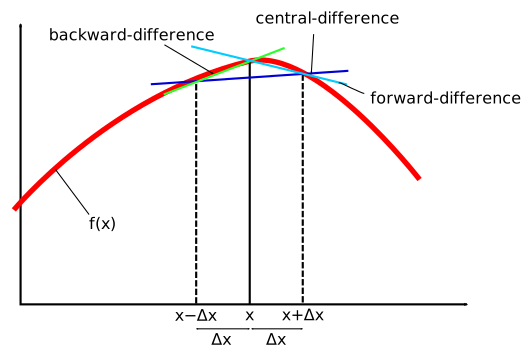
Image from Wikipedia
The key idea is to approximate the derivative by measuring how much the function changes when we make a small perturbation along each coordinate. The central difference formula is:
$$\frac{\partial f}{\partial w_i} \approx \frac{f(\mathbf w + \epsilon \hat{\mathbf u}_i) - f(\mathbf w - \epsilon \hat{\mathbf u}_i)}{2\epsilon}$$
where $\hat{\mathbf u}_i$ is a unit vector with 1 in the $i$-th position and 0 elsewhere, and $\epsilon$ is a small step size (like $10^{-5}$).
Think of it like checking your speedometer: if you drive a tiny distance and time how long it takes, you can estimate your speed. Similarly, if you move a tiny amount along each coordinate axis and see how the function changes, you can estimate each component of the gradient.
Now, implement two functions to compute the gradient of the least-squares objective
$f(\mathbf w) = \tfrac12\lVert A\mathbf w - \mathbf b\rVert_2^2$:
one using the analytical formula and one using finite differences for verification. Use NumPy (optionally einsum) for vectorized implementation.
Hint: You can use the np.eye(d) function to create the unit vectors. Note that b has shape (n,), so it may need an extra axis (b[:, None]) to broadcast against an (n, d) array.
In submission.py, implement least_squares_grad(w, A, b) (analytic gradient) and least_squares_finite_diff_grad(w, A, b, epsilon=1e-5) (central-difference gradient). The autograder will compare them on random instances.
Problem 3: Optimization
Optimization is central to AI - we cast many AI problems as finding the best solution in a rigorous mathematical sense. In this problem, you'll work with analytical optimization techniques and implement them using NumPy to verify your mathematical solutions computationally.
The programming component will help you understand how theoretical optimization translates to practical implementations. You'll derive the minimizer of a weighted quadratic analytically and then use gradient descent to find it numerically.
The textbook for MATH 51 may be useful for the optimization problems here, specifically the sections "Maxima, Minima, and Critical Points" (p. 186).
-
Let $x_1, \dots, x_n$ be real numbers representing positions on a number line.
Let $w_1, \dots, w_n$ be positive real numbers representing the importance of each of these positions.
Consider the quadratic function: $f(\theta) = \sum_{i=1}^n w_i (\theta - x_i)^2$. Note that $\theta$ here is a scalar.
What value of $\theta$ minimizes $f(\theta)$? Show that the optimum you find is indeed a minimum. What
problematic issues could arise if some of the $w_i$'s are negative?
Note: You can think about this problem as trying to find the point $\theta$ that's not too far
away from the $x_i$'s. Over time, hopefully you'll appreciate how nice quadratic functions are to minimize.
An expression for the value of $\theta$ that minimizes $f(\theta)$ and how you got it. A short calculation/argument to show that it is a minimum. 1-2 sentences describing a problem that could arise if some of the $w_i$'s are negative. Show your work.
-
Gradient Descent for a 1D Quadratic:
Implement
gradient_descent_quadratic(x, w, theta0, lr, num_steps) in submission.py to minimize the scalar objective
$f(\theta) = \sum_{i=1}^n w_i (\theta - x_i)^2$, where $\theta\in\mathbb{R}$ (recall problem 3a).
The function should return the final scalar iterate after num_steps gradient steps.
Implementation of gradient descent to minimize the quadratic function from problem 3a. Your function should perform num_steps iterations of gradient descent starting from theta0 with learning rate lr.
Problem 4: Ethical Issue Spotting
One of the goals of this course is to teach you how to tackle real-world problems with tools from AI. But real-world problems have real-world consequences. Along with technical skills, an important skill every practitioner of AI needs to develop is an awareness of the ethical issues associated with AI. The purpose of this exercise is to practice spotting potential ethical concerns in applications of AI - even seemingly innocuous ones.
In this question, you will explore the ethics of four different real-world scenarios using the ethics guidelines produced by a machine learning research venue, the NeurIPS conference. The NeurIPS Ethical Guidelines list seventeen non-exhaustive concerns under General Ethical Conduct and Potential Negative Social Impacts (the numbered lists). For each scenario, you will write a potential negative impacts statement. To do so, you will first determine if the algorithm / dataset / technique could have a potential negative
social impact or violate general ethical conduct (again, the seventeen numbered items taken from the NeurIPS Ethical Guidelines page). If the scenario does violate ethical conduct or has potential negative social impacts, list one concern it violates and justify why you think that concern applies to the scenario. If you do not think the scenario has an ethical concern, explain how you came to that decision.
Unlike earlier problems in the homework there are many possible good answers. If you can justify your answer, then you should feel confident that you have answered the question well.
Each of the scenarios is drawn from a real AI research paper; you should think about why the researchers may have chosen for the algorithms to behave in the way as described in the scenario. The ethics of AI research closely mirror the potential real-world consequences of deploying AI, and the lessons you'll draw from this exercise will certainly be applicable to deploying AI at scale. As a note, you are not required to read the original papers, but we have linked to them in case they might be useful. Furthermore, you are welcome to respond to anything in the linked article that's not mentioned in the written scenario, but the scenarios as described here should provide enough detail to find at least one concern.
A 2-5 sentence paragraph for each of the scenarios where you either A. identify at least one ethical concern from the
NeurIPS Ethical Guidelines and justify why you think it applies, or B. state that you don't think a concern exists and justify why that's the case. Chosen scenarios may have anywhere from zero to multiple concerns that match, but you are only required to pick one concern (if it exists) and justify your decision accordingly. Furthermore, copy out and
underline the ethical checklist item to which you are referring as part of your answer (i.e.:
Severely damage the environment). We have also included a citation in the example solution below, but you are not required to add citations to your response.
Example Scenario:
You work for a U.S. hospital that has recently implemented a new intervention program that enrolls at-risk patients in programs to help address their chronic medical issues proactively before the patients end up in the hospital. The intervention program automatically identifies at-risk patients by predicting patients' risk scores, which are measured in terms of healthcare costs. However, you notice that for a given risk score tier, the Black patients are considerably sicker when enrolled than white patients, even though their assigned illness risk score is identical. You manually re-assign patients' risk scores based on their current symptoms and notice that the percentage of Black patients who would be enrolled has increased from 17% to over 45% [1].
Example Solution: This algorithm has likely encoded, contains, or potentially exacerbates bias against people of a certain race or ethnicity since the algorithm predicts healthcare costs. Because access to medical care in the U.S. is unequal, Black patients tend to have lower healthcare costs than their white counterparts [2]. Thus the algorithm will incorrectly predict that they are at lower risk.
-
An investment firm develops a simple machine learning model to predict whether an individual is likely to default on a loan from a variety of factors, including location, age, credit score, and public record. After looking through their results, you find that the model predicts mainly based on location and that the model mainly accepts loans from urban centers and denies loans from rural applicants [3]. Furthermore, looking at the gender and ethnicity of the applicants, you find that the model has a significantly higher false positive rate for Black and male applicants than for other groups. In a false positive prediction, a model misclassifies someone who does not default as likely to default.
-
Stylometry is a way of predicting the author of contested or anonymous text by analyzing the writing patterns in the anonymous text and other texts written by the potential authors. Recently, highly accurate machine learning algorithms have been developed for this task. While these models are typically used to analyze historical documents and literature, they could be used for deanonymizing a wide range of texts, including code [4].
-
A research group scraped millions of faces of celebrities off of Google images to develop facial recognition technology [5]. The celebrities did not give permission for their images to be used in the dataset and many of the images are copyrighted. For copyrighted photos, the dataset provides URL links to the original image along with bounding boxes for the face.
-
Researchers have recently created a machine learning model that can predict plant species automatically directly from a single photo [6]. The model was trained using photos uploaded to the iNaturalist app by users who consented to use of their photos for research purposes, and the model is only used within the app to help users identify plants they might come across in the wild.
Submission
Submission is done on Gradescope.
Written: When submitting the written parts, make sure to select all the pages
that contain part of your answer for that problem, or else you will not get credit.
To double check after submission, you can click on each problem link on the right side, and it should show
the pages that are selected for that problem.
Programming: After you submit, the autograder will take a few minutes to run. Check back after
it runs to make sure that your submission succeeded. If your autograder crashes, you will receive a 0 on the
programming part of the assignment. Note: the only file to be submitted to Gradescope is submission.py.
More details can be found in the Submission section on the course website.
[1]
Obermeyer et al. Dissecting racial bias in an algorithm used to manage the health of populations. 2019.
[2]
Institue of Medicine of the National Academies. Unequal Treatment:
Confronting Racial and Ethnic Disparities in Health Care. 2003.
[3]
Imperial College London. Loan Default Prediction Dataset. 2014.
[4]
Caliskan-Islam et. al. De-anonymizing programmers via code stylometry. 2015.
[5]
Parkhi et al. VGG Face Dataset. 2015.
[6]
iNaturalist. A new vision model. 2020.