Minimax, Expectimax.
The homework requires Python 3.12. You do not need to install it yourself: the homework ships with a pyproject.toml pinned to 3.12, and uv sync (below) downloads that interpreter if it is missing. To confirm, run uv run python --version inside the homework directory after syncing.
Like previous assignments, we will use uv to set up the homework environment quickly.
Please refer to the official uv installation documentation for the most up-to-date installation instructions for your platform.
# Install uv once
curl -LsSf https://astral.sh/uv/install.sh | sh

# Optional: `uv` binary by default goes to `$HOME/.local/bin` on Linux/macOS,
# so you may need to add it to your PATH (uv may have done this for you):
export PATH="$HOME/.local/bin:$PATH"
# Install uv once
powershell -ExecutionPolicy ByPass -c "irm https://astral.sh/uv/install.ps1 | iex"
# Then open a NEW terminal window so that `uv` is on your PATH
# Download the homework zip and unzip into `hw5_pacman/`
# In your hw directory (it ships with a pyproject.toml pinned to Python 3.12)
uv sync                   # Create .venv, fetch Python 3.12 if needed, install numpy
uv run python grader.py   # Run the local grader
If you prefer typing python directly, activate the environment first with source .venv/bin/activate (on Windows: .venv\Scripts\activate) and run commands with python instead, for example python grader.py and python pacman.py -p ReflexAgent.
numpy is available, but you might find that it isn't necessary for this assignment.
If you see ModuleNotFoundError: No module named 'tkinter': the grader does not need graphics, and you can run games without them using -q. To get graphics, install Tk with sudo apt-get install python3.12-tk (Ubuntu/WSL) or brew install python-tk@3.12 (macOS).
If you cannot run the assignment on your laptop or need additional computing resources, Stanford provides FarmShare, a community computing environment for coursework and unsponsored research. Please follow the instructions at https://docs.farmshare.stanford.edu/ to get started with the computing environment.
Introduction
Pac-Man, now with ghosts.
Minimax, Expectimax.
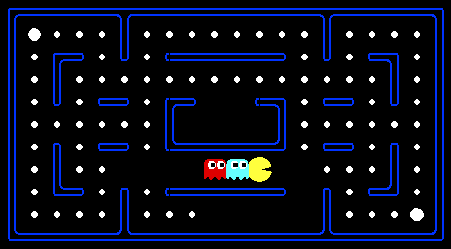
For those of you not familiar with Pac-Man, it's a game where Pac-Man (the yellow circle with a mouth in the above figure) moves around in a maze and tries to eat as many food pellets (the small white dots) as possible, while avoiding the ghosts (the other two agents with eyes in the above figure). If Pac-Man eats all the food in a maze, it wins. The big white dots at the top-left and bottom-right corner are capsules, which give Pac-Man power to eat ghosts in a limited time window, but you won't need to worry about them until Problem 4. You can get familiar with the setting by playing a few games of classic Pac-Man, which we come to just after this introduction.
In this assignment, you will design agents for the classic version of Pac-Man, including ghosts. Along the way, you will implement both minimax and expectimax search.
The base code for this assignment contains a lot of files, which
are listed towards the end of this page; you, however, do not need to
go through these files to complete the assignment. These are present only to
guide the more adventurous amongst you to the heart of Pac-Man. As in previous
assignments, you will only be modifying submission.py.
We've created a LaTeX template here for you to use that contains the prompts for each question.
If you use Overleaf, also upload pacman_multi_agent.png and minimax_depth.png from the zip, since the template includes them.
What to Submit
submission.py, submitted to the programming assignment on Gradescope. Upload the file itself, not a zip or folder, and check that the autograder results appear.Important Note: Please Read!
The grader.py included is useful to verify whether or not your solution crashes due to bugs or to verify Pac-Man behavior,
but will not give reliable information on whether your submission will time out on any of the tests.
We included a number of 0-point basic tests that will replicate the behavior of the hidden tests,
but only give feedback on whether or not your solution times out. To properly ensure that your implementation will not
time out, please make sure to do test submissions on Gradescope and observe the results on these 0-point tests.
First, play a game of classic Pac-Man to get a feel for the assignment:
uv run python pacman.pyYou can always add
--frame_time 1 to the command line
to run in "demo mode" where the game pauses after
every frame.
Now, run the provided ReflexAgent in submission.py:
uv run python pacman.py -p ReflexAgentNote that it plays quite poorly on this default
medium_classic layout, even though it does fine on a tiny one:
uv run python pacman.py -p ReflexAgent -l test_classicYou can also try out the reflex agent on
medium_classic with one ghost or two.
uv run python pacman.py -p ReflexAgent -k 1
uv run python pacman.py -p ReflexAgent -k 2
Note: You can never have more ghosts than the layout permits.
Options: Default ghosts are random; you can also play for fun with slightly smarter directional ghosts using -g DirectionalGhost. You can also play multiple games in a row with -n and an integer indicating the number of games to play. Turn off graphics with -q to run lots of games quickly.
Now that you are familiar enough with the interface, inspect the ReflexAgent code carefully (in submission.py) and make sure you understand what it's doing. The reflex agent code provides some helpful examples of methods that query the GameState: A GameState object specifies the full game state, including the food, capsules, agent configurations, and score changes: see submission.py for further information and helper methods, which you will be using in the actual coding part. We are giving an exhaustive and very detailed description below, for the sake of completeness and to save you from digging deeper into the starter code. The actual coding part is very small -- so please be patient if you think there is too much writing.
Note: If you wish to run the game in the terminal using a text-based interface,
check out the terminal directory.
Note 2: If the action tiebreaking is done deterministically for Problems 1, 2, and 3, running on the medium_classic map may cause mostly losses. This is alright since the grader test cases don’t run on these layouts.
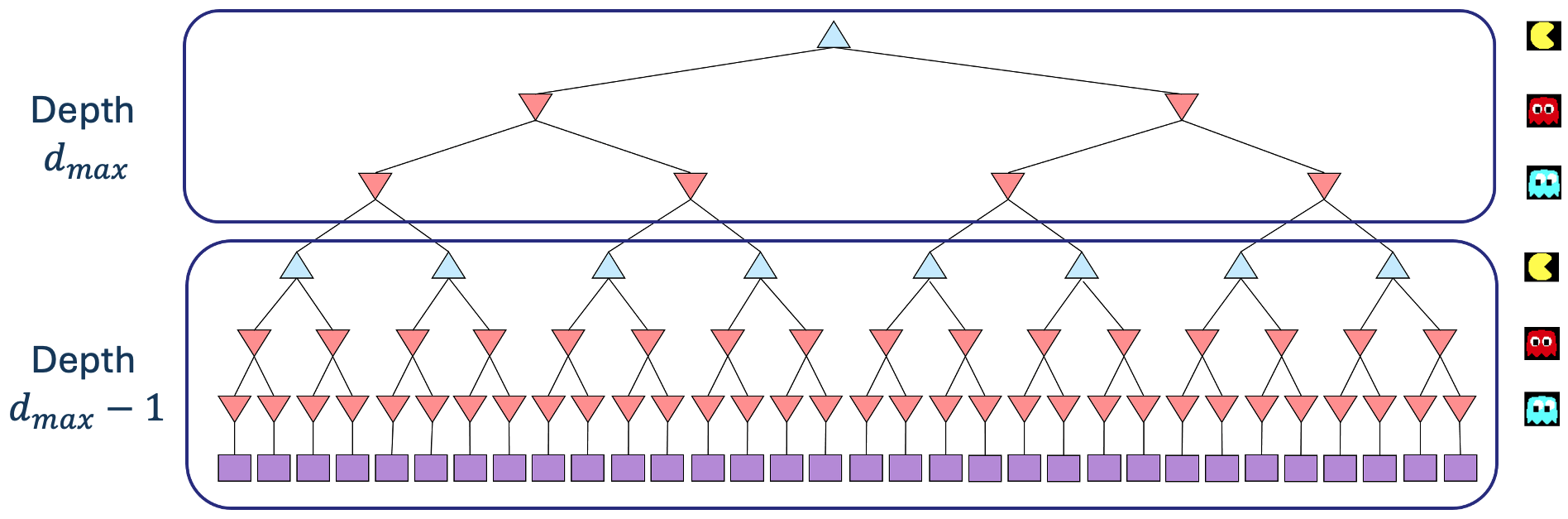
Formally, consider the limited depth tree minimax search with evaluation functions taught in class. Suppose there are $n+1$ agents on the board, numbered $0, \ldots, n$, where agent $0$ is Pac-Man and the rest are ghosts. Pac-Man acts as a max agent, and the ghosts act as min agents. A single depth consists of all $n+1$ agents making a move, so depth 2 search will involve Pac-Man and each ghost moving two times. In other words, a depth of 2 corresponds to a height of $2(n+1)$ in the minimax game tree (see diagram below).
The diagram draws two branches per node to keep it readable. In the actual game, each node has one branch per legal action of the agent whose turn it is: up to four (North, South, East, West), and fewer when walls block the way.
Comment: In reality, all the agents move simultaneously. In our formulation, actions at the same depth happen at the same time in the real game. To simplify things, we process Pac-Man and ghosts sequentially. You should just make sure you process all of the ghosts before decrementing the depth.
Before diving into the recurrence, let's understand our notation. In the recurrence for $V_{\text{minmax}}(s,d)$, $s$ represents the current state, and $d$ represents the current depth in the game tree, with $d = d_{\text{max}}$ indicating the root of the tree (initial state) and decreasing as we go deeper into the tree.
Write the recurrence for $V_{\text{minmax}}(s,d)$ in math as a piecewise function. You should express your answer in terms of the following functions:MinimaxAgent class in
submission.py using the above recurrence.
Remember that your minimax
agent (Pac-Man) should work with any number of ghosts, and your minimax tree should have
multiple min layers (one for each ghost) for every max layer.
Your code should be able to expand the game tree to any given depth. Score the
leaves of your minimax tree with the supplied
self.evaluation_function, which defaults to
score_evaluation_function. The class
MinimaxAgent extends MultiAgentSearchAgent, which
gives access to self.depth and
self.evaluation_function. Make sure your minimax code makes
reference to these two variables where appropriate, as these variables are
populated from the command line options.
MinimaxAgent class in submission.py.GameState.get_score.
self.evaluation_function), and you should call this function without changing it. Use self.evaluation_function in your definition of $V_\text{minmax}$ wherever you used $\text{Eval}(s)$ in part $1a$. Recognize that now we're evaluating states rather than actions. Look-ahead agents evaluate future states whereas reflex agents evaluate actions from the current state. get_action must return an action.
self.index in your minimax implementation to refer to Pac-Man's index.
Notice that only Pac-Man will actually be running your MinimaxAgent.
GameStates, either passed in
to get_action or generated via
GameState.generate_successor. In this assignment, you will not be
abstracting to simplified states.
ReflexAgent
and MinimaxAgent useful.
minimax_classic layout are 9, 8, 7, and -492 for depths 1, 2, 3, and 4, respectively (passed into the “-a depth=[depth]” argument). If you forget -l minimax_classic, you will run on the default medium_classic layout instead, where the values are 9, 18, 27, and 36. You can use these numbers to verify whether your implementation is correct. To verify, you can print your calculated minimax value in get_action and check if the value of the initial state (first value that appears) is equal to the value listed above. Note that your Pac-Man agent will often win, despite the dire prediction of depth 4 minimax search, whose command is shown below. With depth 4, our Pac-Man agent wins 50-70% of the time. Depths 2 and 3 will give a lower win rate. Be sure to test on a large number of games using the -n and -q flags. Check the instructions in "Warmup" for more details on running multiple games in a row.
uv run python pacman.py -p MinimaxAgent -l minimax_classic -a depth=4
small_classic setup used by 1b-0-basic and 2a-0-basic (two DirectionalGhosts, depth 2), our solution wins only about 10–15% of games.These questions and observations are here for you to ponder upon; no need to include in the write-up.
open_classic and
medium_classic (the default), you'll find Pac-Man to be good at not
dying, but quite bad at winning. It will often thrash around without making
progress. It might even thrash around right next to a dot without eating it.
Don't worry if you see this behavior. Why does Pac-Man thrash around right next to a dot? AlphaBetaAgent. Again, your algorithm will be slightly more
general than the two-player version from lecture, so part of the challenge is to
extend the alpha-beta pruning logic appropriately to multiple ghost agents.
You should see a speed-up: perhaps depth 3 alpha-beta will run as fast as
depth 2 minimax. Depth 3 on medium_classic should take well under a
tenth of a second per move:
uv run python pacman.py -p AlphaBetaAgent -a depth=3To make sure your implementation does not time out on the hidden tests, check the results of the 0-point tests when you submit to Gradescope.
The AlphaBetaAgent should compute the same minimax values as the
MinimaxAgent, although it may choose different actions when there are ties.
For the initial state, the minimax values are 9, 8, 7, and -492 on minimax_classic
and 9, 18, 27, and 36 on the default medium_classic (the command above),
for depths 1, 2, 3, and 4 respectively. You can check them by printing the value of the
initial state in get_action. When comparing the speed of the two agents, use the
same layout for both (for example, add -l minimax_classic to the command above).
Prune only on strict inequality: stop exploring a node when its value is strictly greater than beta (at a max node) or strictly less than alpha (at a min node). Pruning on equality can change which of several equally good actions is chosen.
AlphaBetaAgent class in submission.py.ExpectimaxAgent, where your Pac-Man agent no longer assumes ghost agents take actions that minimize Pac-Man's utility. Instead, Pac-Man tries to maximize its expected utility and assumes it is playing against multiple RandomGhosts, each of which chooses from
get_legal_actions uniformly at random.
You should now observe a more cavalier approach to close quarters with ghosts. In particular, if Pac-Man perceives that it could be trapped but might escape to grab a few more pieces of food, it will at least try.
uv run python pacman.py -p ExpectimaxAgent -l trapped_classic -a depth=3You may have to run this scenario a few times to see Pac-Man's gamble pay off. Pac-Man would win half the time on average, and for this particular command, the final score would be -502 if Pac-Man loses and 532 if it wins. You can use these numbers to validate your implementation. As you implement this, think about why Pac-Man's behavior as an expectimax agent differs from its behavior as a minimax agent (i.e., why doesn't it head directly for the ghosts?). We'll ask for your thoughts later, in Problem 5.
ExpectimaxAgent class in submission.py.better_evaluation_function.
The evaluation function should evaluate states rather than actions.
You may use any tools at your disposal for evaluation, including the helper functions in util.py.
We will run your ExpectimaxAgent from Problem 3 with depth 2 and your evaluation function
for 50 games on the small_classic layout against two random ghosts.
To receive credit, your average score over all 50 games (wins and losses both count)
must be at least 1000. For reference, the default score_evaluation_function
averages well below 1000, so you will need to design your own features.
All 50 games together must also finish within 60 seconds.
You can watch your agent play, or run many games quickly, with:
uv run python pacman.py -l small_classic -p ExpectimaxAgent -a eval_fn=better -q -n 50
This prints the average score over all games, but on different random games each time.
The local grader (test 4a-1-basic) runs a fixed set of 50 games and reports your exact score on them.
The hidden test (4a-1-hidden) runs 50 different games, so make sure your evaluation function
works well in general and not just on the public games.
better_evaluation_function in submission.py
whose average score over 50 games is at least 1000.Hints and Observations
ExpectimaxAgent from Problem 3 works first, since this problem uses it.
random.seed or otherwise change the state of Python's random module: the grader seeds each game itself.GameState you used, and how you combined them (for example, weights or reciprocals).Before diving into the problem, it would be beneficial to refer to the AI alignment module to gain deeper insights and context:
In this problem we'll revisit the differences
between our minimax and expectimax agents, and
reflect upon the broader consequences of AI misalignment: when our agents don't do what we want them to do, or
technically do, but cause unintended consequences along the way. Going back to Problem 3, consider the following runs of the
minimax and expectimax agents on the small
trapped_classic environment:
uv run python pacman.py -p MinimaxAgent -l trapped_classic -a depth=3
uv run python pacman.py -p ExpectimaxAgent -l trapped_classic -a depth=3
Be sure to run each command a few times, as there is some
randomness in the environment and the agents' behaviors, and pay attention, as
the episode lengths can be quite short. You can always add --frame_time 1 to the
command line so the game pauses after every frame. What you should see is that the minimax
agent will always rush towards the closest ghost, while the expectimax agent
will occasionally be able to pick up all of the pellets and win the episode.
(If you don't see this behavior, your implementations could be incorrect!)
Then answer the following questions:
score_evaluation_function) and/or the default utility function $\text{Utility}(s)$ (i.e. the final game score) that would prevent the minimax agent from dying instantly in the trapped_classic environment, and behave more closely to that of the expectimax agent.
GameState object, or give concrete numbers; just describe the hypothetical change in the functions. An answer which suggests changes to how the game score is computed itself (which both $\text{Eval}(s)$ and $\text{Utility}(s)$ depend upon) will also be accepted.
Go Pac-Man Go!
submission.py |
Where all of your multi-agent search agents will reside, and the only file that you need to concern yourself with for this assignment. |
pacman.py |
The main file that runs Pac-Man games. This file also describes a Pac-Man
GameState type, which you will use extensively in this assignment. |
game.py |
The logic behind how the Pac-Man world works. This file describes several supporting types like
AgentState, Agent, Directions, and Grid. |
util.py |
Helper functions and data structures, such as manhattan_distance and Counter. |
graphics_display.py |
Graphics for Pac-Man. |
graphics_utils.py |
Support for Pac-Man graphics. |
text_display.py |
ASCII graphics for Pac-Man. |
ghost_agents.py |
Agents to control ghosts. |
keyboard_agents.py |
Keyboard interfaces to control Pac-Man. |
layout.py |
Code for reading layout files and storing their contents. |
[1] For more examples of reward hacking (or "specification gaming"), see this article from DeepMind and this list of concrete examples of reward hacking observed in the AI literature.